Deploying Autonomous AI Agents in Dynamics 365: 2026 Wave 1 Implementation Guide
The 2026 enterprise software market has hit a major turning point. With the official rollout of the Microsoft Dynamics 365 2026 Release Wave 1 (covering features dropping between April and September 2026), Microsoft has fundamentally shifted its AI strategy. Copilot is no longer just a passive conversational chatbot waiting for a prompt, it has evolved into an embedded, autonomous Agentic AI layer.
For technology executives, managing directors, and CFOs across the GCC, this update marks a major shift in how enterprise operations handle workload. The system is moving from an AI-assisted model to an AI-driven operational model. Instead of simply summarizing an email, Microsoft's new first-party autonomous agents can monitor inbox channels, match subledgers, process multi-currency expenses, and execute transactional workflows entirely on their own.
As a certified Microsoft Dynamics 365 implementation partner in UAE, Dynamics Stream has built this blueprint to help mid-market and enterprise businesses deploy, govern, and extract clear commercial value from these new autonomous capabilities.
The Architectural Reality of Agentic ERP
In traditional setups, workflows rely on human triggers. An invoice arrives, an accountant opens it, matches it to a purchase order (PO), and manually routes it for approval.
The 2026 Wave 1 architecture replaces this reactive process with a continuous, background execution layer. Built natively into Microsoft Dataverse and extended via Microsoft Copilot Studio, these agents operate as persistent digital employees. They don’t wait for you to log in, they run constantly, looking for exceptions and flagging them for human review only when safety or validation parameters are breached.
3 Core AI Agents Reshaping Operations
While Wave 1 introduces hundreds of macro-updates, three specific autonomous agents are delivering immediate, measurable capacity gains for organizations across Dubai, Abu Dhabi, and the broader region.
1. The Payables Agent (Business Central)
Designed to tackle tedious procurement and accounting tasks, the Payables Agent acts as an automated processing engine for accounts payable divisions.
How it works: The agent monitors designated corporate mailboxes, automatically isolates incoming vendor invoices, and extracts line-item data. It then matches the paperwork against open purchase orders inside Business Central.
The 2026 Wave 1 Upgrade: It identifies processed documents directly in your email client and posts verified matches directly to your general ledger. If a price mismatch occurs, it drafts an automated email back to the supplier detailing the variance, saving it in Outlook as a draft for human approval.
2. The Expense Agent (Cross-App & Mobile)
Expense management has historically been a major friction point for mobile workforces and regional engineering consultants.
How it works: Operating natively across the Business Central mobile application and Microsoft 365 tools, the Expense Agent takes over end-to-end expense receipt processing.
The 2026 Wave 1 Upgrade: Employees can snap photos of receipts on the go. The agent extracts the merchant data, auto-classifies the expenditure according to corporate tax policy, flags multi-currency exchange rate anomalies, and routes the digital expense report directly through your management approval loops hands-free.
3. The Account Reconciliation Agent (Finance & Operations)
Month-end close stress is an absolute bottleneck for multi-entity holdings. The Account Reconciliation Agent changes this from a periodic scramble to a continuous state of readiness.
How it works: Operating quietly behind the scenes, this agent continually crawls financial ledgers to match subledger balances directly to your general ledger.
The 2026 Wave 1 Upgrade: It flags variances in real-time, runs automatic root-cause analysis on currency fluctuations or posting timing differences, and presents accounting teams with pre-calculated adjustment entries.
Technical Deployment Strategy
Deploying autonomous agents requires structured configuration across your administration portals to ensure they operate within secure boundaries.
1. Provision the Agent Environments: Admin Center Activation
Log into the Microsoft Power Platform Admin Center and navigate to your Dynamics 365 environment settings. Enable the 2026 Wave 1 preview features toggle and provision the specific agent packages (Payables or Expense) into your production or sandbox instances.
2. Establish Data Governance and MCP Constraints: Model Context Protocol (MCP)
Utilize the newly enhanced Model Context Protocol (MCP) server structures to bind your autonomous agents. Define rigid security boundaries, row-level data constraints, and explicit field access privileges inside Microsoft Dataverse so agents can only view or modify approved datasets.
3. Configure Approval Gates and Threshold Triggers: Copilot Studio Integration
Open Copilot Studio to calibrate your operational guardrails. Set clear financial thresholds (for example, allowing the Payables Agent to automatically clear variances under 500 AED, while mandating human approval for any discrepancy above that limit).
4. Execute Pipeline Validation in Sandbox: End-to-End Dry Run
Ingest sample data—such as a non-standard vendor invoice PDF—into your test environment. Verify that the agent correctly parses the schema, cross-references your internal items database, and writes an error log or pending transaction entry without manual intervention.
Elevating the Employee Workspace: Immersive Home
To complement these autonomous layers, the 2026 Wave 1 release marks the General Availability of Microsoft Immersive Home.
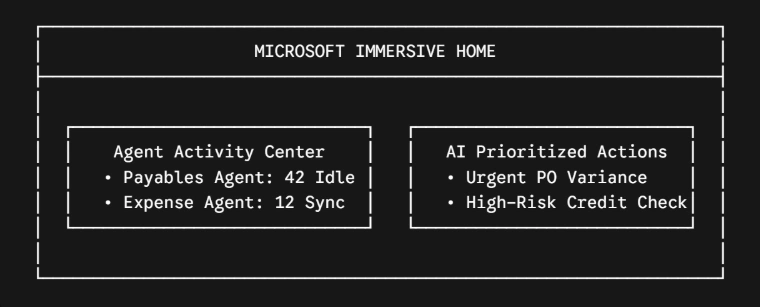
Rather than forcing users to click through traditional ERP menus, grids, and submenus, Immersive Home serves as a central, AI-prioritized cockpit. It displays live status updates for active background agents and flags the precise items requiring human attention. Your team shifts from processing data to managing AI execution.
Drive Corporate Efficiency with Dynamics Stream
Transitioning your ERP infrastructure from a passive database into an active, autonomous environment requires a partner with deep technical expertise. As a premier Dynamics 365 implementation partner in UAE, Dynamics Stream helps businesses integrate these cutting-edge capabilities seamlessly into their business processes.
Our local engineering teams ensure your core systems are configured safely, your internal data structures map perfectly via the Model Context Protocol, and your organization maximizes its return on investment from Microsoft’s latest cloud innovations. Reach out to our digital transformation specialists at our Dubai headquarters today to schedule an environment assessment and start deploying your autonomous AI workforce.
Share with






Give us your details.
We’ll get in touch.
Rabik Raja
Director Sales and Account Management
Mahmoud Mohamed
Dynamics 365 Sales Specialist


Our Readings